
Adding your thesis to Pure
How to prepare your thesis file, and any additional digital research materials, for deposit to Pure and how best to share your thesis once it has become publicly available online.
Thesis Deposit Requirements: Doctoral & Research Masters Students
To receive their certificate, students are required to add the final version of their thesis to the University of Bristol’s research repository (Pure). The thesis is made available to the public via the Bristol Research Portal.
Within 28 days of the notification of your award (or confirmation that corrections are satisfactory, if applicable) you must upload:
- your thesis document(s), and
- a completed Thesis Deposit Form.
What to do if you no longer have access to Pure
If you are required to deposit your thesis in Pure, you should have access to the system. If you find you do not have access, please email lib-research-support@bristol.ac.uk.
Processing & ‘Validation’ Timelines
Our eTheses Validation team (Library Services) will process your submission within six weeks of deposit and make it available via the Bristol Research Portal. You must have deposited your thesis to receive your award certificate. The relevant teams will be able to check this, even if your thesis is not yet publicly available.
If you’ve chosen to apply an initial embargo or you have been granted a longer deferral, only a basic record including your thesis abstract will be publicly visible. Once the agreed date has passed the file will become publicly available.
The version of your thesis submitted for examination may contain material that cannot be shared publicly online. You must always deposit this copy to Pure as the definitive record.
Where necessary, you must also create a separate version which does not include the sensitive material. This is known as ‘redacting.’ The redacted version will be made publicly available.
Content you must always remove: personal data and third-party copyrighted material which you do not have permission to reproduce in the public copy. These redactions are often small and do not normally require University approval.
Our guidance on how to redact material will help you identify what needs to be removed and how to ensure your thesis retains appropriate formatting (e.g. page numbers).
If you identify information in the examination copy of your thesis which cannot be shared openly, you will need to produce a redacted version. You must deposit:
- the final complete version submitted for examination (public access will be restricted);
- the redacted version suitable for sharing (public access will be enabled)
There are specific conditions when embargoes, longer deferrals, and substantial redactions may be appropriate and require University approval. You can find out more about when you should request approval for substantial redactions or a longer deferral in our detailed guidance on delaying public access to your thesis.
Your thesis file should be:
- a PDF file
- the same as the version submitted for examination except that Personal Data in the ‘Preliminary pages’ (eg signatures, emails, student number) should be removed. Preliminary pages are listed in section 18.19 of the PGR Code.
For more information on the requirements of the content and format of your thesis, including for public access, please refer to section 18 and section 25 of the Regulations and Code of Practice for Research Degree Programmes (PGR Code).
Please name your file(s) as follows. Use the award date in your file name.
- File name (thesis): Final_Copy_[year_month_day]_[your surname_your initials]_[award type].
- File name (redacted thesis, if applicable): Redacted_Final_Copy_[year_month_day]_[your surname_your initials]_[award type].
- File name (deposit form): Thesis_Deposit_Form_[your surname_your initials].
An infinite variety of materials are created throughout the research process.
Some will be ‘born’ digital and some will be physical; for example, musical scores, handwritten lab books, samples, and specimens. The University’s repository system can only accept digital material. You will need to decide how best to digitise your research materials; images can be scanned, performances recorded, and materials made available elsewhere can be described and/or catalogued, like resources in a museum.
Section 18.40 of the PGR Code states that all digital materials should be combined into one PDF file, wherever possible. There may be some occasions where this is not practical or appropriate. For instance:
- If the dataset is too large.
- It has been decided that the data should be ‘sensitive’ or ‘controlled’ to protect personal data.
- The materials have already been released as a separate data publication. In this instance, include the DOI to the data publication using the Add link field when you create your Pure record.
If transforming the file type would impact the nature of the additional materials, like reducing the functionality of a spreadsheet, digital files can be uploaded to Pure on the same record as your thesis as Supplementary Materials. However, if these are research data, it may be appropriate to use our Research Data Repository instead. Please see the Research data and your thesis webpage for more information.
Once your thesis is publicly available, users can discover it via the Bristol Research Portal.
You can also share the record directly by using its Handle. A Handle is a persistent identifier used in the Bristol Research Portal.
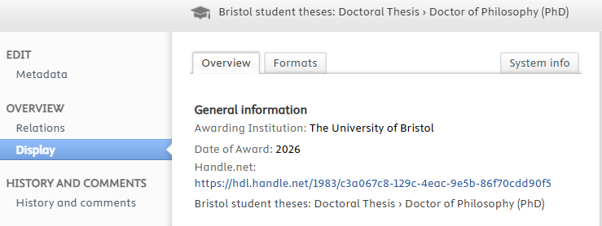
In the Pure record, you can find the Handle for your thesis record by clicking Display from the menu on the left.
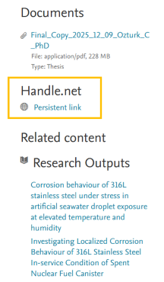
In the public thesis record (Bristol Research Portal) you will find the Handle for your thesis record on the right-hand side. Right-click on ‘Persistent link’ to copy it.
Step-by-step: Depositing your thesis to Pure
Log in to Pure then click on the green Add new button:

Choose Bristol student theses from the menu on the left.
Select the template for the appropriate Doctoral or Masters Thesis.
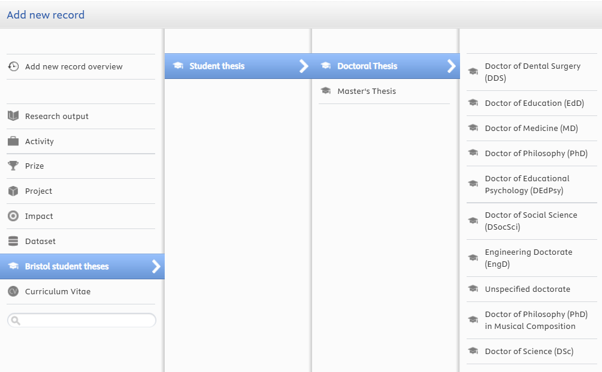
Ensure you select the appropriate qualification, e.g. Doctor of Dental Surgery (DDS), Doctor of Education (EdD), etc.
You will be prompted to accept the Depositor Declaration. Review these carefully before ticking the box to confirm you accept the terms and selecting ‘Continue’. A copy of the declaration terms is available as a PDF, for reference: Bristol Thesis Deposit Agreement (PDF, 112kB)
You must provide some metadata about your thesis and award.
- Enter the title, subtitle (if appropriate), and abstract in the Thesis Content Information fields.
- The Author, Student thesis managed by and Supervisors sections will be pre-populated with your name and your academic School. These details cannot be amended.
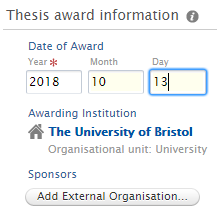
- Add the date of award in the Thesis award information section. You can also add details of external sponsorship you have received, if applicable.
You will need to provide the relevant files as separate Documents.
- the PDF file of your thesis (see the file name instructions below)
- your completed Thesis Deposit Form
- if applicable, any additional research materials which could not be included in the PDF thesis file.
In the Documents section click Add document then click the Drag file or browse your computer box.
To do this, select the file in your file explorer window, then click Open. The file will be uploaded.
File name instructions: please rename the files before uploading them using the template below. Never include your student number. Please use your award date in the file name.
- File name (thesis): Final_Copy_[year_month_day]_[your surname_your initials]_[award type].
- File name (redacted thesis): If you are uploading a redacted copy of your thesis, use this file name: Redacted_Final_Copy_[year_month_day]_[your surname_your initials]_[award type].
- File name (deposit form): Thesis_Deposit_Form_[your surname_your initials].
- Additional research materials should have a suitable file name which provides a brief description of the contents and includes your surname and initials. They can be uploaded as additional documents using the ‘Supplementary materials’ document type.
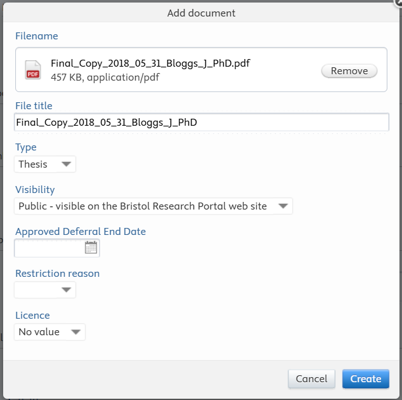
Once the file has been uploaded, select the file Type (i.e. Thesis, Deposit Form, Supplementary Materials).
Click Create, without altering any other fields.
If you have applied an initial embargo or been granted a longer deferral, the eTheses Validation team will use the information provided on your Thesis Deposit Form to process the record accordingly
(Optional) You can link your thesis record to existing Publications or related Projects and/or Activities.
- In the Relations section, add links to any Publications on which you’re an author, or Projects or Activities you’ve been involved in at Bristol.
If you are ready to submit the record ‘for validation’, click Save.
If you are not ready to submit the record and will return to edit the record, set the Status of record as Entry in progress and click Save.
Note: Validation can take up to six weeks before the record is made public in the Bristol Research Portal.
If you have any questions please contact Research Support (Library Services) .